> ## Documentation Index
> Fetch the complete documentation index at: https://docs.niobi.co/llms.txt
> Use this file to discover all available pages before exploring further.
# Callback URLS
> Our payments API uses callbacks to notify you of final statuses of payments.
## Configuring a Callback URL
You can configure a callback URL by including your specified URL as a parameter in the API request body. This setup allows you to receive real-time notifications for both payouts and pay-ins, ensuring seamless integration with your system.
## Callback for Payins
### Through USSD Push
For collections using USSD push, you can configure your callback url as specificed below.
Pass in the url you'd like to receive the callback response on under the params object as "callback\_url".
```json theme={null}
{
"params": {
"amount": "Deposit_amount",
"mobile": "Mobile_number",
"country_id": "Country_id",
"currency": "Currency",
"payment_method_type": "Payment_method_type",
"callback_url": "Your_callback-url",
"third_party_reference_1": "Third_party_reference"
}
}
```
Generate a signature for the specified parameters using the [generate signature endpoint](/api-reference/payment/generates-signature-for-niobi-integration)
Make the API request using the payload generated.
```json theme={null}
{
"client_id": "AxxxxxxxxxxxxxxxxxxxxxxxxxxxxJ",
"params": {
"amount": 10,
"callback_url": "https://your-domain.com/niobi/result",
"country_id": 1,
"currency": "KES",
"mobile": "254711111111",
"payment_method_type": "send money",
"third_party_reference_1": "TRANS1"
},
"salt": "mySalt123",
"sender": "Integration Name",
"timestamp": 123,
"signature": "0xxxxxxxxxxxxxxxxxxxxxxxxxxxxxxxxxxxxxxxxxx5"
}
```
Once the transaction is processed you will receive a callback response as shown below.
```json theme={null}
{
"client_id": "AxxxxxxxxxxxxxxxxxxxxxxxxxxxxJ",
"salt": "mySalt123",
"sender": "Integration Name",
"timestamp": 123,
"signature": "0xxxxxxxxxxxxxxxxxxxxxxxxxxxxxxxxxxxxxxxxxx5"
"params": {
"amount": 10,
"depositId": "Axxxxxxxxxx1",
"email": "hello@niobi.co",
"failureReason": {
"failureCode": "Failure Code from MNO in case of failure",
"failureMessage": "Descriptive message on the failure reason in case of failure"
},
"fees": 0.3,
"message": "Transaction summary message",
"mobile": "254711111111",
"name": "Username",
"payment_link_id": null,
"payment_link_payment_id": null,
"reference" : " Transaction id",
"status": "success",
"statusCode": "000000",
"third_party_reference_1": "TRANS1",
"third_party_reference_2": null,
}
}
```
### Through Payment Links
For payins collected via payment links, you can configure your callback url as part of the params field while creating a payment link. Once a payment will be made to your account
using the payment link, you will receive a response on the callback.
```json theme={null}
{
"params": {
"amount": 10,
"depositId": "Axxxxxxxxxx1",
"email": "hello@niobi.co",
"failureReason": {
"failureCode": "Failure Code from MNO in case of failure",
"failureMessage": "Descriptive message on the failure reason in case of failure"
},
"fees": 0.3,
"message": "Transaction summary message",
"mobile": "254711111111",
"name": "Username",
"payment_link_id": null,
"payment_link_payment_id": null,
"reference" : " Transaction id",
"status": "success",
"statusCode": "000000",
"third_party_reference_1": "TRANS1",
"third_party_reference_2": null,
}}
```
## Callback for Payouts
For disbursements, you can configure your callback url as specified below.
Pass in the url you'd like to receive the callback response on under the params object as "callback\_url".
```json theme={null}
{
"params": {
"amount": 1000,
"customer_identifier": 1234,
"currency": "KES",
"payment_reference": "TRANS-123456789",
"first_name": "John",
"last_name": "Doe",
"mobile": "254123456789",
"email": "john@doe.com",
"country_id": "1",
"city": "Nairobi",
"postal_code": "001001",
"line1": "abc, xyz",
"description": "abc, xyz",
"client_callback_url": "https://your-domain.com/niobi/result",
"third_party_reference_1": "TRANS1",
"third_party_reference_2": "",
"payment_method_type": "send money",
"sendmoney": [
{
"phone_number": "254123456789"
}
]
}
}
```
Generate signature for the specified parameters using the generate signature endpoint
Make the API request using the payload generated.
```json theme={null}
{ "client_id": "AeiQYngNXwZK8vrvjdO6RyrI8hsDtUk4v3KWCBGJ",
"params": {
"amount": 1000,
"customer_identifier": 1234,
"currency": "KES",
"payment_reference": "TRANS-123456789",
"first_name": "John",
"last_name": "Doe",
"mobile": "254123456789",
"email": "john@doe.com",
"country_id": "1",
"city": "Nairobi",
"postal_code": "001001",
"line1": "abc, xyz",
"description": "abc, xyz",
"client_callback_url": "https://your-domain.com/niobi/result",
"third_party_reference_1": "TRANS1",
"third_party_reference_2": "",
"payment_method_type": "send money",
"sendmoney": [
{
"phone_number": "254123456789"
}
]
},
"salt": "mySalt123",
"sender": "Testerr",
"timestamp": 1726586109,
"signature": "06390dff8b362a06a72da9f7400c18e88d4164b4c9b90d8ec2db0a369b050375"}
```
Once the transaction is processed you will receive a callback response as shown below.
```json theme={null}
{
"client_id": "Your client id",
"params": {
"account": "80xxxxx3",
"account_number": "",
"amount": 10,
"currency" : "KES",
"fee": 5,
"message": "Payment was transferred successfully.",
"mobile": "254123456789",
"paybill_number": "",
"payee": "JohnDoe 123",
"payment_channel": "Send Money",
"payment_reference": "OID51",
"payoutId": "bd8f51a2-xxxx-xxxx-xxxx-xxxxx9a",
"ref": "SII6ZH9PU0",
"statusCode": "000000",
"third_party_reference_1": "TRANS1",
"third_party_reference_2": null,
"transaction_date": "2024-09-18 00:00:00",
"transaction_detail": "Disbursement made through M-Pesa Send Money",
"type": "Pay out"
},
"salt": "salt value",
"sender": "Integration name",
"timestamp": 123,
"signature": "7xxxxxxxxxxxxxxxxxxxxxxxxxxxxxxxxxxxxxb"
}
```
## Response Structure
Below is a summary of the response structure of the callback responses expected.
### Payins
```json theme={null}
{
"client_id": "Your client id",
"sender": "Integration title",
"salt": "Random salt value",
"timestamp": "Timestamp",
"params": {
"amount": "Amount deposited",
"currency":"Transaction currency",
"depositId": "Transaction id of the deposit",
"email": "Your email address",
"failureReason": {
"failureCode": "Failure Code from MNO in case of failure",
"failureMessage": "Descriptive message on the failure reason in case of failure"
},
"mobile": "Mobile that made the deposit",
"message": "Message describing deposit success or failure",
"name": "Account username",
"payment_link_id": null,
"payment_link_payment_id": null,
"reference" : " Transaction id",
"status": "Status of the deposit",
"statusCode": "Status code of the transaction"
"third_party_reference_1": "TRANS1",
"third_party_reference_2": null,
},
"signature": "Request signature"
}
```
Please note that the **"depositId"** field represnets the transaction id of the deposit.
### Payouts
```json theme={null}
{
"client_id": "Your client id",
"sender": "Integration title",
"salt": "Random salt value",
"timestamp": "Timestamp",
"params": {
"account": "The account number of the account the payment was made from",
"account_number" : "Account number for paybill payment method",
"amount": "Amount paid out",
"currency":"Currency of the payment",
"fee": "Fees incurred for the payment",
"message": "Message describing the transaction status",
"mobile": "Mobile number of the recipient",
"payee": "Full name of the recipient",
"payment_channel": "Payment channel",
"payment_reference": "Unique information passed by user to identify transaction",
"payoutId": "Unique transaction id of the payment",
"ref": "Transaction reference shared by provider",
"statusCode": "Status code of the transaction",
"third_party_reference_1": "External reference",
"third_party_reference_2": "External reference",
"transaction_date": "Date payment was made",
"transaction_detail": "Message with details of the transaction",
"type": "Transaction type"
},
"signature": "Request signature"
}
```
Please note that the **"depositId"** field represents the transaction id of the deposit.
## Timeout Callbacks
For deposit transactions, a callback response is typically sent if a 2-minute timeout occurs on our end. Once the transaction is successful, a successful callback will be sent, and the transaction status will be updated accordingly.
```json theme={null}
{
"client_id": "Your client id",
"sender": "Integration title",
"salt": "Random salt value",
"timestamp": "Timestamp",
"params": {
"depositId": "Transaction id of the deposit",
"name": "Account username",
"email": "Your email address",
"amount": "Amount deposited",
"mobile": "Mobile that made the deposit",
"third_party_reference_1": "1st Third party reference",
"third_party_reference_2": "2nd Third party reference",
"status": "timeout",
"statusCode": "000006"
"message": "Transaction failed due to timeout."
},
"signature": "Request signature"
}
```
## Resending Callbacks
You can resend callbacks in case of a delivery failure through the payment portal. To do this, access the specific transaction and click on "Resend Callback."
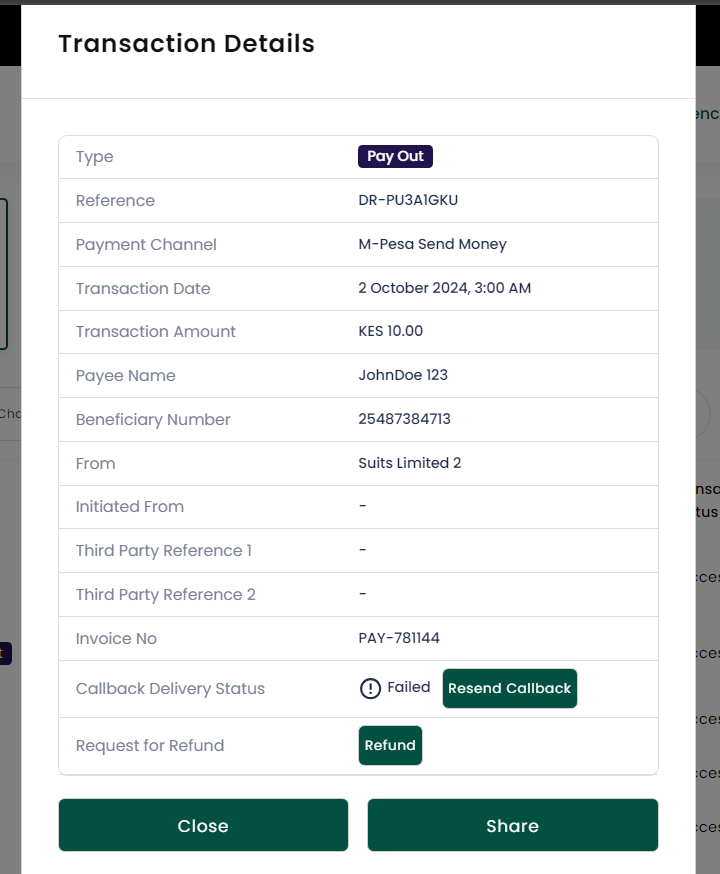 To learn more about transaction status codes, refer to the [Status Codes section](/failure-codes#transaction-status-codes)