> ## Documentation Index
> Fetch the complete documentation index at: https://docs.niobi.co/llms.txt
> Use this file to discover all available pages before exploring further.
# Collect Payments
To start collecting payments using these methods, ensure that your Niobi account is set up and verified. Refer to the ‘Setting up a Niobi Account’ section in the [Getting Started](https://docs.niobi.co/quickstartv2) section for detailed steps on account creation and setup.
## Payment Collection Flow
Please refer to the flow chart below to understand the payment collection flow. The "Merchant Client" refers to our API Clients who are collecting payments from their customers.
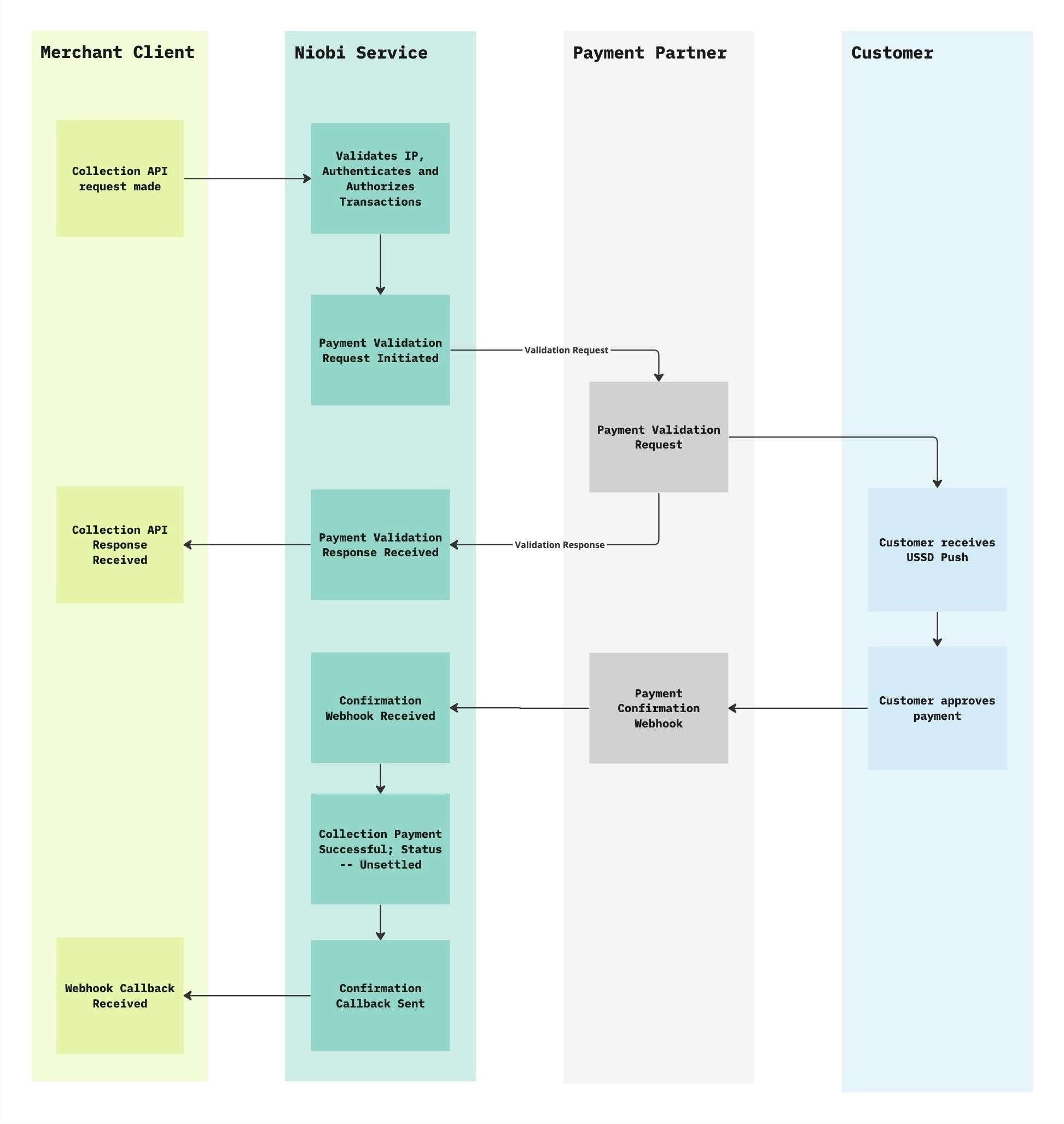 For Senegal Orange deposits, the end user receives an SMS with a shortcode after the deposit is initiated. They dial the shortcode, triggering a USSD prompt where they input their PIN to approve the transaction.
## Using the API
The unified-collections api endpoint is used for collecting payments across the supported countries. Please find the full API reference [here](/api-reference/payment-link/unified-collections).
You will be required to pass in the following parameters :
| Parameter | Type | Required | Description |
| ------------------------- | ------ | ------------ | ------------------------------------------------------------------------------------------------------------------ |
| **Amount** | Number | Yes | The amount to be deposited to your account. |
| **Mobile** | String | Yes | The phone number that will be making the payment. |
| **Country ID** | String | Yes | The ID of the country the deposit will be made from. The full list can be found [here](#). |
| **Currency** | String | Yes | The currency in which the deposit will be made. |
| **Payment Method Type** | String | Yes | The payment channel that will be used for the deposit. |
| **Callback URL** | String | No | The URL to receive the callback response on. |
| **Third Party Reference** | String | No | Information you’d like to use to refer to the deposit later. |
| **Name** | String | Only for NGN | Customer’s name (Only for Nigerian deposits). |
| **Account Name** | String | Only for NGN | Customer’s account name that would appear when funds are reconciled in their account (Only for Nigerian deposits). |
You will then generate a signature using the parameters above and proceed to make an API request using the payload.
On successful deposit, you will receive a callback response with the deposit details. Please find a detailed description of the callback response under [Callback URL Section.](/callback-urls)
`name` and `account_name` fields are only applicable for Nigerian bank deposits.
## Front End Integration
This section provides a high-level overview of how to integrate your front-end with the Collections API.
To begin, integrate the unified Collections API endpoint and initiate a deposit transaction by making an API request.
#### Sample API Request
```json theme={null}
{
"client_id": "client_id",
"params": {
"amount": "10000",
"callback_url": "https:/exmaple.com",
"country_id": 1,
"currency": "KES",
"mobile": "254xxxxxxxxx0",
"payment_method_type": "send money",
"third_party_reference_1": "",
"third_party_reference_2": ""
},
"salt": "salt_value",
"sender": "Integration_name",
"timestamp": xxxxx,
"signature": "0xxxxxxxxxxxxxxxxxxxxxxxxxxxxxxxxxxx5"
}
```
After the initial request is completed, the user will be prompted to input an authentication token on their phone to verify the transaction.
Once the transaction request has been processed, you have two options for managing the transaction status:
For Senegal Orange deposits, the end user receives an SMS with a shortcode after the deposit is initiated. They dial the shortcode, triggering a USSD prompt where they input their PIN to approve the transaction.
## Using the API
The unified-collections api endpoint is used for collecting payments across the supported countries. Please find the full API reference [here](/api-reference/payment-link/unified-collections).
You will be required to pass in the following parameters :
| Parameter | Type | Required | Description |
| ------------------------- | ------ | ------------ | ------------------------------------------------------------------------------------------------------------------ |
| **Amount** | Number | Yes | The amount to be deposited to your account. |
| **Mobile** | String | Yes | The phone number that will be making the payment. |
| **Country ID** | String | Yes | The ID of the country the deposit will be made from. The full list can be found [here](#). |
| **Currency** | String | Yes | The currency in which the deposit will be made. |
| **Payment Method Type** | String | Yes | The payment channel that will be used for the deposit. |
| **Callback URL** | String | No | The URL to receive the callback response on. |
| **Third Party Reference** | String | No | Information you’d like to use to refer to the deposit later. |
| **Name** | String | Only for NGN | Customer’s name (Only for Nigerian deposits). |
| **Account Name** | String | Only for NGN | Customer’s account name that would appear when funds are reconciled in their account (Only for Nigerian deposits). |
You will then generate a signature using the parameters above and proceed to make an API request using the payload.
On successful deposit, you will receive a callback response with the deposit details. Please find a detailed description of the callback response under [Callback URL Section.](/callback-urls)
`name` and `account_name` fields are only applicable for Nigerian bank deposits.
## Front End Integration
This section provides a high-level overview of how to integrate your front-end with the Collections API.
To begin, integrate the unified Collections API endpoint and initiate a deposit transaction by making an API request.
#### Sample API Request
```json theme={null}
{
"client_id": "client_id",
"params": {
"amount": "10000",
"callback_url": "https:/exmaple.com",
"country_id": 1,
"currency": "KES",
"mobile": "254xxxxxxxxx0",
"payment_method_type": "send money",
"third_party_reference_1": "",
"third_party_reference_2": ""
},
"salt": "salt_value",
"sender": "Integration_name",
"timestamp": xxxxx,
"signature": "0xxxxxxxxxxxxxxxxxxxxxxxxxxxxxxxxxxx5"
}
```
After the initial request is completed, the user will be prompted to input an authentication token on their phone to verify the transaction.
Once the transaction request has been processed, you have two options for managing the transaction status:
-
**Receiving a Callback.**
A callback response containing the transaction details will be sent to your configured URL. You can set up an endpoint on your front end to handle this callback and update the user interface accordingly, such as displaying success or failure messages based on the transaction outcome.
-
**Constantly Querying Transaction Status.**
Alternatively, you can query the transaction status endpoint periodically (recommended for 2 minutes) to check for updates on the transaction status.
By following this flow, you can seamlessly integrate your front end with the API, ensuring secure and responsive transaction processing for your users.
## Bank Collections
We supported collections through bank transfers on our unified collections API.
The Bank Transfer service is currently available only for Nigerian Naira (NGN) transactions.
For overpayment, the expected amount will be processed, while any excess will be automatically reversed to the customer if the deposit is successful. Always collect the exact amount.
### NGN Virtual Account Collections
Niobi now supports NGN virtual account collections as an additional method. Virtual accounts work similarly to bank deposits, but they are temporary and expire within 30 minutes.
* Use `payment_method_type`: `virtual_account` in the collection request payload.
* Send the exact amount to avoid reversals.
### How It Works
To collect payments through bank transfer (or virtual account) payments, make an API call to our unified collections API with the required payment details (`name` and `account_name`). A dynamic virtual bank account will be generated for the transaction, which your customer can use to make the payment. Once the payment is made, a callback notification will be sent to confirm the transaction details.
A dynamic virtual bank account is a temporary, single-use bank account that expires after a single transaction.
Currently supported banks for dynamic virtual accounts:
- Wema Bank
- Sterling Bank
- Providus Bank
Additional bank options will be made available over time.
### Sample API Request
```json theme={null}
{
"client_id": "client_id",
"params": {
"account_name": "Bank name",
"amount": "10000",
"callback_url": "https:/exmaple.com",
"country_id": 17,
"currency": "NGN",
"mobile": "234xxxxxxxxx0",
"name": "Joseph Mike",
"payment_method_type": "virtual_account/bank",
"third_party_reference_1": "",
"third_party_reference_2": ""
},
"salt": "salt_value",
"sender": "Integration_name",
"timestamp": xxxxx,
"signature": "0xxxxxxxxxxxxxxxxxxxxxxxxxxxxxxxxxxx5"
}
```
The name and account name fields are required for Nigerian deposits and refer to the customer's name and their bank account name when the amount is resolved in their account.
### Sample API response
```json theme={null}
{
"success":true,
"message":"Verification token was sent to your mobile number. Kindly verify to proceed payment.",
"data":{
"account_name":"BTC Bank",
"amount":"10000",
"callback_url":"https:\/\/example.com",
"country_id":17,
"currency":"NGN",
"mobile":"234xxxxxxxxx0",
"account_number":"76xxxx98",
"name":"Joseph Mike",
"payment_method_type":"mtn",
"third_party_reference_1":"",
"third_party_reference_2":"",
"MerchantRequestID":"8xxxxxxxxxxxxxxxxxxx3",
"depositId":"8xxxxxxxxxxxxxxxxxxx3",
"status":"success",
"bank_name": "Bank name",
"bank_code": "000",
"status": "success"
},
"status_code":"000000"
}
```
## South Africa (ZAR) Bank (EFT) Collections
Our unified collections API also supports bank deposits via EFT in South Africa.
### How It Works
To collect payments through bank transfer payments, make an API call to our unified collections API with the required payment details. An authorization url will be generated where the user will be redirected to their bank's authentication system to approve the transactio. Once the payment is made, a callback notification will be sent to confirm the transaction details.
Currently supported banks for EFT collections:
- ABSA
- FNB
- Investec
- Nedbank
- Standard Bank
- Bidvest Bank
- TymeBank
### Sample API Request
```json theme={null}
{
"client_id": "your_client_id",
"params": {
"amount": 500,
"bank_code": "0001",
"callback_url": "https://webhook.site/",
"country_id": 15,
"currency": "ZAR",
"mobile": "276xxxxxxxx8",
"name": "John Doe",
"payment_method_type": "bank",
"third_party_reference_1": "ZAR_DEPOSIT",
"successful_url":"https://niobi.co",
"failure_url":"https://niobi.co"
},
"salt": "unique_salt",
"sender": "Integration Name",
"timestamp": "UNIX_timestamp",
"signature": "generated_signature"
}
```
### Sample API Response
```json theme={null}
{
"status": "success",
"message": "Verification token was sent to your mobile number. Kindly verify to proceed with payment",
"data": {
"amount": "1000",
"currency": "ZAR"
"authorization_url":"https://www.xxxxxxxxxxxxx"
//other fields
}
}
```
Once a payment is completed, we send a webhook notification to your provided URL. You can use the reference from the payload to retrieve payment details using our transaction status API.
## Wave Senegal Collection Flow
This section provides a high-level overview of the collections flow for Wave payment method in Senegal.
To begin, integrate the unified Collections API endpoint and initiate a deposit transaction by making an API request with 2 additional fields `successful_url` and `failure_url`.
#### Sample API Request
```json theme={null}
{
"client_id": "client_id",
"params": {
"amount": "10000",
"callback_url": "https:/exmaple.com",
"country_id": 1,
"currency": "KES",
"mobile": "254xxxxxxxxx0",
"payment_method_type": "send money",
"third_party_reference_1": "",
"third_party_reference_2": "",
"successful_url":"",
"failure_url":""
},
"salt": "salt_value",
"sender": "Integration_name",
"timestamp": xxxxx,
"signature": "0xxxxxxxxxxxxxxxxxxxxxxxxxxxxxxxxxxx5"
}
```
A callback response containing an authoriztion url will be sent to your configured URL. Open this authorization url in your browser of choice to proceed with the payment.
Once the transaction request has been processed, you will receive a callback with the transaction details. Alternatively, you can query the transaction status endpoint periodically (recommended for 2 minutes) to check for updates on the transaction status.
## OTP Verification (Ivory Coast Orange Payins)
For Orange payins in Côte d’Ivoire, OTP verification is required. This ensures secure authorization of deposits initiated via our Collections API.
### How It Works
**Step 1: Initiate a Deposit Request**
* Make a request to initiate a deposit using our [collections api](/api-reference/collection/unified-collections).
An OTP will be sent to the customer’s mobile number.
A sample response to the deposit initiation:
```json theme={null}
{
"success": true,
"message": "Verification token was sent to your mobile number. Kindly verify to proceed payment.",
"data": {
"status": "pending",
"created_at": "2025-04-16T07:33:06.000000Z",
"updated_at": "2025-04-16T07:33:09.000000Z",
"amount": "2",
"to": "225076xxxx602",
"ref": null,
"currency": "XOF",
"country_id": 3,
"country": "Côte d’Ivoire",
"sender": "xxxx",
"salt": "niobi_salt",
"first_name": null,
"last_name": null,
"email": "john@doe.com",
"third_party_reference_1": "TRANS-123456789",
"third_party_reference_2": null,
"payment_initiator": "xxxxx",
"failureCode": null,
"payment_token": "7cb952a7-xxxx-xxxx-xxxx-3d88b6aa3"
},
"status_code": "000000"
}
```
**Step 2: Verify the Transaction**
To complete the payin, verify the transaction using the client's OTP and the payment\_token.
Endpoint: /v4/niobi-unified-process-transaction
```json theme={null}
{
"client_id": "TLNnEXPhsFmBUbU6vwVPVAVZCLVUC7OL2Bu5HnQo",
"params": {
"otp": "1234",
"payment_token": "7cb952a7-6477-4ff0-8736-3dd9488b6aa3"
},
"salt": "niobi_salt",
"sender": "ApexVim",
"timestamp": 1744788807,
"signature": "3a3cf7f2e3ff8d4ee991d7e1323312887dfda8536b8c2e197d0d4ef764013658"
}
```
**Sandbox:** Use OTP `000000` to simulate a successful verification when testing on the sandbox environment.
A successful verification will confirm that the transaction has been authorized and is being processed accordingly.