> ## Documentation Index
> Fetch the complete documentation index at: https://docs.niobi.co/llms.txt
> Use this file to discover all available pages before exploring further.

# Collection Methods

> Comprehensive guide to supported collection methods across Africa: Mobile Money USSD push, OTP verification, Bank Transfers, Virtual Accounts, and Redirect flows.

## Overview

Niobi supports diverse payment collection channels across Africa. Depending on the destination country, your application can collect funds via Mobile Money, Dynamic Virtual Accounts, Bank Transfers, or Browser Redirects.

### Master Country Collection Matrix

|   ID   | Country                                                                                                 | Currency | Supported Methods (`payment_method_type`)              |
| :----: | :------------------------------------------------------------------------------------------------------ | :------: | :----------------------------------------------------- |
|  **1** | [Kenya](/countries/kenya)                                                                               |   `KES`  | `send money` (M-Pesa), `airtel`                        |
|  **2** | [Benin](/countries/benin)                                                                               |   `XOF`  | `mtn`, `moov`                                          |
|  **3** | [Côte d'Ivoire](/countries/cote-d-ivoire)                                                               |   `XOF`  | `Orange` (OTP), `mtn`, `moov`, `Wave`                  |
|  **4** | [Cameroon](/countries/cameroon)                                                                         |   `XAF`  | `mtn`, `Orange`                                        |
|  **5** | [DRC](/countries/drc)                                                                                   |   `CDF`  | `airtel`, `Orange`, `vodacom`                          |
|  **8** | [Rwanda](/countries/rwanda)                                                                             |   `RWF`  | `mtn`, `airtel`                                        |
|  **9** | [Senegal](/countries/senegal)                                                                           |   `XOF`  | `Orange` (USSD PIN), `free`, `Wave`                    |
| **10** | [Tanzania](/countries/tanzania)                                                                         |   `TZS`  | `airtel`, `halotel`, `tigo`, `vodacom`                 |
| **11** | [Uganda](/countries/uganda)                                                                             |   `UGX`  | `mtn`, `airtel`                                        |
| **12** | [Zambia](/countries/zambia)                                                                             |   `ZMW`  | `mtn`, `zamtel`, `airtel`                              |
| **13** | [Sierra Leone](/countries/sierra-leone)                                                                 |   `SLE`  | `Orange`                                               |
| **15** | [South Africa](/countries/south-africa)                                                                 |   `ZAR`  | `bank_eft` (EFT), `capitec` (Capitec Pay)              |
| **16** | [Ghana](/countries/ghana)                                                                               |   `GHS`  | `mtn`, `At` (AirtelTigo), `vodafone`                   |
| **17** | [Nigeria](/countries/nigeria)                                                                           |   `NGN`  | `virtual_account` (Bank Transfer)                      |
| **18** | [Mali](/countries/mali)                                                                                 |   `XOF`  | `Orange`, `moov`                                       |
| **19** | [Burkina Faso](/countries/burkina-faso)                                                                 |   `XOF`  | `Orange`, `moov`                                       |
| **20** | [Togo](/countries/togo)                                                                                 |   `XOF`  | `moov`, `tmoney`                                       |
|   N/A  | **[Hosted Checkout](/collecting-payments/basics#option-1-niobi-hosted-checkout-fastest--zero-ui-code)** |   *All*  | Pre-built payment links across all supported countries |

### Upcoming Collection Corridors

| Country                             | Code | Currency | Planned Payment Methods        |
| :---------------------------------- | :--: | :------: | :----------------------------- |
| [Ethiopia](/countries/ethiopia)     |  251 |   `ETB`  | teleBirr, mBirr                |
| [Malawi](/countries/malawi)         |  265 |   `MWK`  | Airtel Money, TNM Mpamba       |
| [Egypt](/countries/egypt)           |  20  |   `EGP`  | Vodafone Cash, Orange Money    |
| [Mozambique](/countries/mozambique) |  258 |   `MZN`  | Vodacom M-Pesa, Movitel, Tmcel |

***

## 1. Mobile Money (USSD STK Push)

USSD Push (STK Push) is the standard mobile money collection flow across East and West Africa.

### How It Works:

1. Your backend dispatches `POST /api/v4/niobi-unified-collections` with the corridor-specific `payment_method_type` for that mobile money network.
2. The telco switch sends an instant SIM toolkit prompt to the customer's mobile phone.
3. The customer enters their PIN to authorize the payment.
4. Niobi dispatches a terminal callback (`payment_step: 2`) to the `callback_url` passed under `params.callback_url` in your request.

<Info>
  **`payment_method_type` Matches the Channel and Country:**\
  The value passed in `payment_method_type` is specific to the local payment provider and country:

  * **Kenya (Country ID: 1):** `payment_method_type` = `"send money"` (M-Pesa STK Push) or `"airtel"` (Airtel Money)
  * **Ghana (Country ID: 16):** `payment_method_type` = `"mtn"`, `"At"`, or `"vodafone"`
  * **Côte d'Ivoire (Country ID: 3):** `payment_method_type` = `"Orange"`, `"mtn"`, `"moov"`, or `"Wave"`
  * **Senegal (Country ID: 9):** `payment_method_type` = `"Orange"`, `"free"`, or `"Wave"`
  * **Nigeria (Country ID: 17):** `payment_method_type` = `"virtual_account"` (Dynamic Virtual Account)
  * **South Africa (Country ID: 15):** `payment_method_type` = `"bank_eft"` (Bank EFT) or `"capitec"` (Capitec Pay)

  Always check the individual [Country Guides](/supported-countries) for the exact method strings accepted in each market.
</Info>

### Sample Request: Kenya M-Pesa STK Push (Country ID: 1)

```json theme={null}
{
  "client_id": "YOUR_CLIENT_ID",
  "sender": "YOUR_INTEGRATION_NAME",
  "timestamp": 1724835600,
  "salt": "random_salt_12345",
  "signature": "c6b98e1f5d6a7890bc4e123456789abcdef0123456789abcdef0123456789abc",
  "params": {
    "amount": 1000,
    "currency": "KES",
    "country_id": 1,
    "mobile": "254700000000",
    "payment_method_type": "send money",
    "callback_url": "https://yourdomain.com/niobi/callback",
    "third_party_reference_1": "ORDER-991"
  }
}
```

***

## 2. Dynamic Virtual Accounts (Nigeria - NGN)

For Nigerian collections, Niobi provides **dynamic virtual bank accounts** that expire within 30 minutes.

<Note>
  **Send Exact Amounts:**\
  For NGN virtual account deposits, the expected amount is processed and any overpayment is automatically reversed to the customer upon successful deposit. Always instruct customers to transfer the exact amount.
</Note>

### Required Parameters for Nigerian Virtual Accounts:

* `payment_method_type`: `"virtual_account"` or `"bank"`
* `first_name`: Customer's first name
* `last_name`: Customer's last name
* `account_name`: Customer's full bank account name
* `bank_code`: Code of the issuing bank:
  * `17001`: 78 Finance Company Limited
  * `17002`: Fidelity Bank Limited
  * `17003`: Globus Bank

### Sample Request:

```json theme={null}
{
  "client_id": "YOUR_CLIENT_ID",
  "sender": "YOUR_INTEGRATION_NAME",
  "timestamp": 1724835600,
  "salt": "random_salt_12345",
  "signature": "c6b98e1f5d6a7890bc4e123456789abcdef0123456789abcdef0123456789abc",
  "params": {
    "amount": 10000,
    "currency": "NGN",
    "country_id": 17,
    "mobile": "2348012345678",
    "first_name": "Joseph",
    "last_name": "Mike",
    "account_name": "Joseph Mike",
    "bank_code": "17001",
    "payment_method_type": "virtual_account",
    "callback_url": "https://yourdomain.com/niobi/callback",
    "third_party_reference_1": "NGN-COLL-001"
  }
}
```

### Initial API Response (Returns Virtual Account Details):

```json theme={null}
{
  "success": true,
  "message": "Please use the following bank details for making a deposit via your preferred banking application",
  "data": {
    "account_name": "Joseph Mike",
    "account_number": "7500123497",
    "bank_name": "78 FINANCE COMPANY LIMITED",
    "amount": 10000,
    "currency": "NGN",
    "country_id": 17,
    "mobile": "2348012345678",
    "depositId": "NIO-S12345678",
    "status": "success",
    "payment_step": 1,
    "callback_url": "https://yourdomain.com/niobi/callback"
  },
  "status_code": "000000"
}
```

Display the returned `account_number` and `bank_name` to your customer to complete their transfer. See the [Nigeria Country Guide](/countries/nigeria) for full details.

***

## 3. South Africa Bank Transfers & Capitec (ZAR)

South African collections support both generic bank transfers (EFT) and direct Capitec authorization. There is no `"eft"` value, EFT collections use `payment_method_type: "bank_eft"`, shown below.

<Tabs>
  <Tab title="Bank EFT (South Africa)">
    **`payment_method_type`**: `"bank_eft"`\
    Returns an `authorization_url` where the customer approves the payment directly with their bank (ABSA, FNB, Standard Bank, Nedbank, Investec, Bidvest, TymeBank).

    ```json theme={null}
    {
      "client_id": "YOUR_CLIENT_ID",
      "sender": "YOUR_INTEGRATION_NAME",
      "timestamp": 1724835600,
      "salt": "random_salt_12345",
      "signature": "c6b98e1f5d6a7890bc4e123456789abcdef0123456789abcdef0123456789abc",
      "params": {
        "amount": 500,
        "currency": "ZAR",
        "country_id": 15,
        "mobile": "27600000008",
        "name": "John Doe",
        "bank_code": "0001",
        "payment_method_type": "bank_eft",
        "successful_url": "https://yourdomain.com/payment-success",
        "failure_url": "https://yourdomain.com/payment-failed",
        "callback_url": "https://yourdomain.com/niobi/callback",
        "third_party_reference_1": "ZAR-DEPOSIT-01"
      }
    }
    ```

    **Initial Response:** Returns `"authorization_url": "https://..."` and `"payment_step": 1`. Redirect the customer to this URL.
  </Tab>

  <Tab title="Capitec Collections (South Africa)">
    **`payment_method_type`**: `"capitec"`\
    Capitec Bank collections authenticate directly against the payer's national identity. You must pass the customer's full **13-digit South African ID number** in `params.id_number` (e.g. `"9001015800083"`) for the request to be valid.

    ```json theme={null}
    {
      "client_id": "YOUR_CLIENT_ID",
      "sender": "YOUR_INTEGRATION_NAME",
      "timestamp": 1724835600,
      "salt": "random_salt_12345",
      "signature": "c6b98e1f5d6a7890bc4e123456789abcdef0123456789abcdef0123456789abc",
      "params": {
        "amount": 500,
        "currency": "ZAR",
        "country_id": 15,
        "mobile": "27600000008",
        "name": "John Doe",
        "id_number": "9001015800083",
        "payment_method_type": "capitec",
        "successful_url": "https://yourdomain.com/payment-success",
        "failure_url": "https://yourdomain.com/payment-failed",
        "callback_url": "https://yourdomain.com/niobi/callback",
        "third_party_reference_1": "ZAR-CAPITEC-01"
      }
    }
    ```
  </Tab>
</Tabs>

***

## 4. Wave Collections (Senegal & Côte d'Ivoire)

Wave uses a redirect-based authorization flow, not a USSD push:

<Steps>
  <Step title="1. Initiate the collection">
    Submit the request with `successful_url` and `failure_url` included in the parameters.
  </Step>

  <Step title="2. Redirect the customer to authorize">
    Niobi returns an `authorization_url` (`payment_step: 1`). Redirect the customer to this URL. If they open it on their phone, it launches the Wave app directly to approve payment; if they open it on a desktop browser, the page displays a QR code they can scan with the Wave app on their phone to authorize instead.

    <Frame caption="Opening the authorization_url in a desktop browser: the customer scans the QR code with the Wave app to pay.">
      <img src="https://mintcdn.com/niobi/bEHho4ScQmdmC_cX/images/wave-browser-qr.png?fit=max&auto=format&n=bEHho4ScQmdmC_cX&q=85&s=23586c86e002a400953f9047bc93b951" alt="Wave hosted checkout page with QR code" style={{ maxWidth: '440px', margin: '0 auto', display: 'block' }} width="1859" height="973" data-path="images/wave-browser-qr.png" />
    </Frame>

    <Frame caption="Opening the authorization_url on a phone: the Wave app opens directly to confirm the payment.">
      <img src="https://mintcdn.com/niobi/bEHho4ScQmdmC_cX/images/wave-app-confirm.png?fit=max&auto=format&n=bEHho4ScQmdmC_cX&q=85&s=b26b2a4faf54ab322213ec6c38a4dc5c" alt="Wave app payment confirmation screen" style={{ maxWidth: '240px', margin: '0 auto', display: 'block' }} width="591" height="1280" data-path="images/wave-app-confirm.png" />
    </Frame>
  </Step>

  <Step title="3. Redirect on completion">
    Once the customer approves or cancels the payment in Wave, they're redirected to your `successful_url` or `failure_url` accordingly, and Niobi delivers the terminal webhook callback (`payment_step: 2`) to your `callback_url`.
  </Step>
</Steps>

### Sample Request (Senegal - XOF):

```json theme={null}
{
  "client_id": "YOUR_CLIENT_ID",
  "sender": "YOUR_INTEGRATION_NAME",
  "timestamp": 1724835600,
  "salt": "random_salt_12345",
  "signature": "c6b98e1f5d6a7890bc4e123456789abcdef0123456789abcdef0123456789abc",
  "params": {
    "amount": 5000,
    "currency": "XOF",
    "country_id": 9,
    "mobile": "221763456789",
    "payment_method_type": "Wave",
    "successful_url": "https://yourdomain.com/checkout/success",
    "failure_url": "https://yourdomain.com/checkout/cancel",
    "callback_url": "https://yourdomain.com/niobi/callback",
    "third_party_reference_1": "WAVE-SN-001"
  }
}
```

***

## 5. OTP-Verified Payins (Côte d'Ivoire Orange)

For Orange payins in Côte d’Ivoire, payment authorization requires a two-step OTP process:

### Step 1: Initiate Deposit

Submit the collection request to `POST /api/v4/niobi-unified-collections`. The customer receives an SMS OTP, and the response returns a `payment_token`:

```json theme={null}
{
  "success": true,
  "message": "We've sent a verification prompt to your phone. Please approve it to complete your payment.",
  "data": {
    "status": "success",
    "amount": 2000,
    "currency": "XOF",
    "country_id": 3,
    "payment_token": "NIO-S0000001",
    "payment_step": 1
  },
  "status_code": "000000"
}
```

### Step 2: Verify the Transaction with OTP

Collect the OTP from the customer and send a signed request to `POST /api/v4/niobi-unified-process-transaction`:

```json theme={null}
{
  "client_id": "YOUR_CLIENT_ID",
  "sender": "YOUR_INTEGRATION_NAME",
  "timestamp": 1724835600,
  "salt": "random_salt_12345",
  "signature": "3a3cf7f2e3ff8d4ee991d7e1323312887dfda8536b8c2e197d0d4ef764013658",
  "params": {
    "otp": "000000",
    "payment_token": "NIO-S0000001"
  }
}
```

<Tip>
  * **OTP Validity:** In production, the authorization OTP is valid for **2 minutes**.
  * **Sandbox Testing:** Use OTP `000000` to simulate successful verification when testing in the sandbox environment.
</Tip>

***

<h2 id="hosted-checkout">
  Hosted Checkout & Payment Links
</h2>

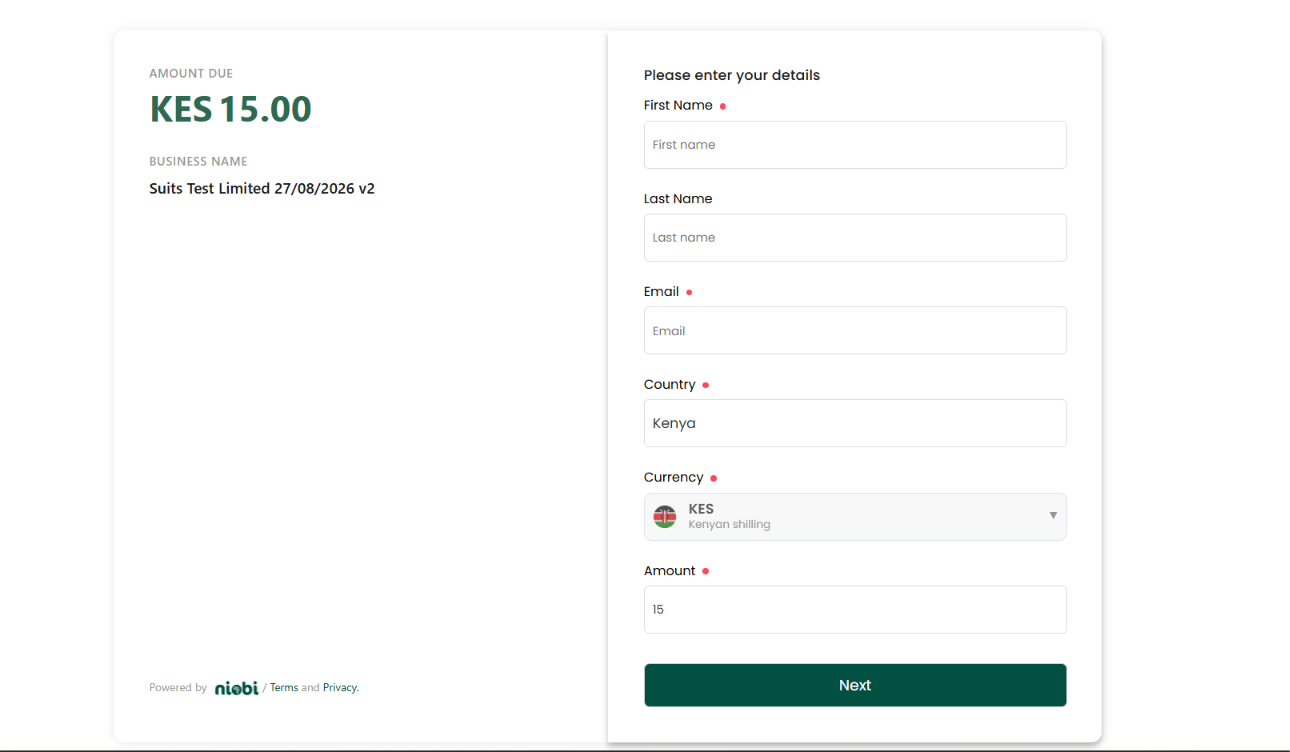
If you want to accept payments without building and maintaining a custom front-end payment interface, Niobi provides **Payment Links** (Hosted Checkout).

This is the fastest and easiest way to start collecting payments across Africa with zero UI code required on your part. For full architectural walkthroughs, dashboard setup, and API parameters, see the [Payment Links Guide](/collecting-payments/payment-links).

<img src="https://mintcdn.com/niobi/bEHho4ScQmdmC_cX/images/niobi-hosted-checkout-page.png?fit=max&auto=format&n=bEHho4ScQmdmC_cX&q=85&s=04781105d848cea0bfae81cceb9c0e92" alt="Niobi Hosted Checkout Interface" width="1290" height="752" data-path="images/niobi-hosted-checkout-page.png" />

### Why Use Hosted Checkout?

* **Zero Front-End Engineering:** You do not need to build complex payment forms, input masks, or error-handling UI. Niobi hosts the entire checkout experience for you.
* **Multi-Currency & Country Support:** Payer details, country selection, and currency conversions are handled automatically on the page.
* **Flexible Distribution:** Share links over WhatsApp, SMS, invoices, emails, or redirect customers directly from your website or mobile app checkout button.
* **Instant Reconciliation:** When a payment is completed on the hosted checkout page, Niobi dispatches an asynchronous webhook callback to your server and credits your merchant wallet in real time.

### How Hosted Checkout Works:

<Steps>
  <Step title="1. Create via Dashboard (No-Code) or API">
    * **Dashboard (No-Code):** Log into your Niobi Dashboard, navigate to **Payments -> Payment Links**, click **Create Payment Link**, enter your item name, currency, and amount (fixed or customer-entered), and copy your generated checkout URL immediately.
    * **API (Programmatic):** Dynamically generate payment links on demand from your backend server using the [Create Payment Link API](/api-reference/payment-links/create) (`POST /api/v3/payment-link-api/create`). You can retrieve, search, and manage active links via the [Payment Link List API](/api-reference/payment-links/list) (`GET /api/payment-link-api/list`). Pass `first_name`, `last_name`, `email`, and `phone` in the request to pre-fill the payer's details on the checkout page, see [Create Payment Link](/api-reference/payment-links/create) for details.
  </Step>

  <Step title="2. Share the Link or Redirect the Payer">
    Provide the generated checkout URL to your customer. When clicked, the customer is presented with the clean, branded Niobi checkout interface shown above.
  </Step>

  <Step title="3. Customer Completes Payment">
    The customer confirms their name, email, country, and currency (pre-filled automatically if you supplied them at creation), then chooses their preferred local payment channel (Mobile Money, Bank Transfer, or Card) to complete authorization.
  </Step>

  <Step title="4. Real-Time Webhook Notification">
    Once the transaction settles, Niobi sends a terminal callback (`payment_step: 2`) to your configured webhook URL and automatically updates your transaction records.
  </Step>
</Steps>

***

## Next Steps

Follow these guides in order to complete your collection integration:

<div className="next-steps-flow">
  <a href="/collecting-payments/callbacks" className="next-step-card">
    <div className="next-step-badge">Step 2</div>
    <h3>Collection Callbacks</h3>
    <p>Handle terminal payment\_step: 2 callbacks, verify signatures, and reconcile outcomes.</p>
  </a>

  <div className="next-step-arrow">
    <svg width="24" height="24" viewBox="0 0 24 24" fill="none" xmlns="http://www.w3.org/2000/svg">
      <path d="M5 12h14M12 5l7 7-7 7" stroke="currentColor" strokeWidth="2.5" strokeLinecap="round" strokeLinejoin="round" />
    </svg>
  </div>

  <a href="/collecting-payments/best-practices" className="next-step-card">
    <div className="next-step-badge">Step 3</div>
    <h3>Collection Best Practices</h3>
    <p>Implement double-verification reconciliation, status polling limits, and error handling.</p>
  </a>
</div>

***

## Country-Specific Guides

For deep dives into local provider configurations, test phone numbers, and country limits, explore our country guides:

<CardGroup cols={3}>
  <Card title="Nigeria Guide" img="https://mintcdn.com/niobi/bEHho4ScQmdmC_cX/images/flags/nigeria-flag.png?fit=max&auto=format&n=bEHho4ScQmdmC_cX&q=85&s=ebd4fe0b0f4247382ffe900dde2093f6" href="/countries/nigeria" className="country-flag-card" width="500" height="500" data-path="images/flags/nigeria-flag.png">
    Virtual accounts (78 Finance, Fidelity, Globus), NGN limits, and sample callbacks.
  </Card>

  <Card title="South Africa Guide" img="https://mintcdn.com/niobi/bEHho4ScQmdmC_cX/images/flags/south-africa-flag.png?fit=max&auto=format&n=bEHho4ScQmdmC_cX&q=85&s=1794d68229601c206d4f1c895faeff4f" href="/countries/south-africa" className="country-flag-card" width="500" height="500" data-path="images/flags/south-africa-flag.png">
    Bank EFT, Capitec Pay, ZAR settlement, and redirect handling.
  </Card>

  <Card title="Kenya Guide" img="https://mintcdn.com/niobi/bEHho4ScQmdmC_cX/images/flags/kenya-flag.png?fit=max&auto=format&n=bEHho4ScQmdmC_cX&q=85&s=3fc8eda86f0ff371eec077d2d0025b1e" href="/countries/kenya" className="country-flag-card" width="500" height="500" data-path="images/flags/kenya-flag.png">
    M-Pesa STK Push, Airtel Money, KES channels, and callbacks.
  </Card>

  <Card title="Senegal Guide" img="https://mintcdn.com/niobi/bEHho4ScQmdmC_cX/images/flags/senegal-flag.png?fit=max&auto=format&n=bEHho4ScQmdmC_cX&q=85&s=6771b18769e6bc4d4c1bafb2f3d628a2" href="/countries/senegal" className="country-flag-card" width="500" height="500" data-path="images/flags/senegal-flag.png">
    Wave browser redirect and Orange SMS shortcode authorization.
  </Card>

  <Card title="Côte d'Ivoire Guide" img="https://mintcdn.com/niobi/bEHho4ScQmdmC_cX/images/flags/cote-d-ivoire-flag.png?fit=max&auto=format&n=bEHho4ScQmdmC_cX&q=85&s=6534739e0dd1ecc13a0c99e791fb2d39" href="/countries/cote-d-ivoire" className="country-flag-card" width="500" height="500" data-path="images/flags/cote-d-ivoire-flag.png">
    Wave redirect and Orange two-step OTP authorization.
  </Card>

  <Card title="All 29 Countries" icon="globe" href="/supported-countries">
    Complete coverage matrix across all 29 supported African markets.
  </Card>
</CardGroup>
