> ## Documentation Index
> Fetch the complete documentation index at: https://docs.niobi.co/llms.txt
> Use this file to discover all available pages before exploring further.

# Collection Basics

> Core fundamentals of collecting payments across Africa: payment steps, request parameters, synchronous dispatch responses, and asynchronous terminal callbacks.

## Overview

Niobi's **Unified Collections API** allows your application to collect payments from customers across Africa through a single standardized integration. Whether your customer pays via Mobile Money (STK Push, OTP, or USSD), Bank Transfer, Dynamic Virtual Account, or Browser Redirect, you send a signed request to the unified collections endpoint:

**Endpoint:** [`POST /api/v4/niobi-unified-collections`](/api-reference/collections/unified-collections)

```mermaid theme={null}
%%{init: {'themeVariables': {'fontSize': '23px', 'actorBorder': '#0D9373', 'actorLineColor': '#0D9373', 'signalColor': '#0D9373', 'noteBorderColor': '#0D9373'}, 'sequence': {'width': 220, 'height': 95, 'actorMargin': 80, 'messageMargin': 60, 'boxMargin': 18, 'noteMargin': 18}}}%%
sequenceDiagram
    autonumber
    participant Customer as Customer (Payer)
    participant Merchant as Your Backend
    participant Niobi as Niobi API
    participant TelcoBank as Telco / Bank Switch

    Merchant->>Niobi: POST /api/v4/niobi-unified-collections (Signed Payload)
    Niobi->>TelcoBank: Dispatch collection request
    Niobi-->>Merchant: Initial HTTP Response (On success: payment_step: 1, status_code: 000000)
    Note over Merchant: Transaction initiated (Pending customer authorization)

    TelcoBank->>Customer: Trigger STK push / Prompt / Issue Virtual Account
    Customer->>TelcoBank: Authorize payment (Enter PIN / Complete Transfer)
    TelcoBank->>Niobi: Confirm payment outcome
    alt Payment Succeeded
        Niobi->>Merchant: Webhook (payment_step: 2, status: "success", statusCode: "000000")
        Note over Merchant: Only now: Credit user balance & fulfill order
    else Payment Failed / Canceled
        Niobi->>Merchant: Webhook (payment_step: 2, status: "failed", statusCode: "000005")
        Note over Merchant: Mark order failed, do not credit user
    end
```

<div className="pstep-flow">
  <div className="pstep-card pstep-card--initial">
    <div className="pstep-card-header">
      <span className="pstep-badge pstep-badge--initial">Step 1</span>
      <span className="pstep-label">Request Initiation</span>
    </div>

    <code className="pstep-code">payment\_step: 1</code>

    <ol className="pstep-substeps">
      <li>Your backend sends a signed <code>POST /api/v4/niobi-unified-collections</code> request, which Niobi dispatches to the telco or bank switch.</li>
      <li>Niobi returns an initial HTTP response confirming the transaction was initiated and is pending customer authorization.</li>
      <li>The switch triggers an STK push, prompt, or issues a virtual account, and the customer authorizes payment (PIN entry or transfer).</li>
    </ol>
  </div>

  <span className="pstep-arrow">→</span>

  <div className="pstep-card pstep-card--terminal">
    <div className="pstep-card-header">
      <span className="pstep-badge pstep-badge--terminal">Step 2</span>
      <span className="pstep-label">Terminal Outcome</span>
    </div>

    <code className="pstep-code">payment\_step: 2</code>

    <ol className="pstep-substeps">
      <li>The switch confirms the payment outcome back to Niobi.</li>
      <li>Niobi sends a webhook callback to your <code>callback\_url</code> with the final status.</li>
      <li>Reconcile the transaction and credit the user based on the final terminal state.</li>
    </ol>
  </div>
</div>

***

## API Environments & Base URLs

Niobi provides separate environments for integration testing and live transaction processing:

| Environment    | Base URL                         | Purpose                                                       |
| :------------- | :------------------------------- | :------------------------------------------------------------ |
| **Sandbox**    | `https://sandbox.users.niobi.co` | Integration testing, mock transactions, and sandbox accounts. |
| **Production** | `https://users.niobi.co`         | Live payment collections and real customer funds.             |

All collection endpoints referenced throughout this guide are relative to your target environment's base URL.

***

## Understanding Payment Steps (`payment_step`)

A critical concept in Niobi's collection architecture is the two-step payment lifecycle:

<div className="pstep-flow">
  <div className="pstep-card pstep-card--initial">
    <div className="pstep-card-header">
      <span className="pstep-badge pstep-badge--initial">Step 1</span>
      <span className="pstep-label">Request Initiation</span>
    </div>

    <code className="pstep-code">payment\_step: 1</code>
    <p className="pstep-desc">Initial HTTP response to the request when it's successful, telling you the transaction was accepted by the telco/bank switch.</p>
  </div>

  <span className="pstep-arrow">→</span>

  <div className="pstep-card pstep-card--terminal">
    <div className="pstep-card-header">
      <span className="pstep-badge pstep-badge--terminal">Step 2</span>
      <span className="pstep-label">Terminal Outcome</span>
    </div>

    <code className="pstep-code">payment\_step: 2</code>
    <p className="pstep-desc">Asynchronous webhook callback delivering the final result (success or failed).</p>
  </div>
</div>

### 1. `payment_step: 1` (Initial API Response)

* **Delivery:** Synchronous HTTP response returned immediately when calling `POST /api/v4/niobi-unified-collections`.
* **Meaning:** The request passed validation, authentication was verified, and the transaction was accepted and dispatched to the upstream payment processor or telco switch.
* **Important:** This is an acknowledgement that the process has begun, **not the final payment outcome**. The customer has not yet entered their PIN or completed the transfer.

<Info>
  **Absence of `payment_step` on Initiation Failures:**\
  If a collection request fails during initial submission (for example, due to an invalid phone number format, unsupported method, or immediate upstream processor rejection returning `status_code: "000005"`), the `"payment_step"` field is **not present** in the response. Your backend must inspect `status_code` (`"000000"` vs `"000005"`) rather than assuming `payment_step` is always returned.
</Info>

### 2. `payment_step: 2` (Terminal Callback)

* **Delivery:** Asynchronous callback POST request sent to the `callback_url` passed in your request.
* **Meaning:** The transaction has reached its **final terminal state**.
* **Action:** When `"payment_step": 2` is present in the `params` object of the callback, treat this as the final outcome. Reconcile your records based on `status: "success"` (`status_code: "000000"`) or `status: "failed"` (`status_code: "000005"`). Full details are covered in [Collection Callbacks](/collecting-payments/callbacks).

<Warning>
  **Rules of Transaction Settlement (Never Credit on `payment_step: 1`):**\
  Niobi's collection flows follow a strict two-step lifecycle. An initial synchronous API response with `"payment_step": 1` is an acknowledgement that the payment request has been delivered to the telecom provider or banking switch; **it is NOT a confirmation of payment**.

  * **Never credit customer balances or release goods on `payment_step: 1`**:\
    Wait for the asynchronous terminal webhook callback (`payment_step: 2`) containing `"status": "success"` (`status_code: "000000"`).
  * **Handle Failure States (`payment_step: 2` with `"status": "failed"` / `"000005"`):**\
    If the callback returns `status: "failed"`, the customer canceled the prompt, entered an incorrect PIN, or lacked funds. Mark the invoice as unpaid.
  * **Missing or Delayed Webhook?**\
    If a callback hasn't arrived after a reasonable wait, query the [Get Transaction Status API](/transaction-status) (`POST /api/v3/get-unified-transaction-status`) to verify the state before taking any action.
</Warning>

***

## Request Parameters

The unified collections endpoint accepts standard parameters wrapped in the signed envelope:

| Parameter                     | Type                 | Required                     | Description                                                                                                                                              |
| :---------------------------- | :------------------- | :--------------------------- | :------------------------------------------------------------------------------------------------------------------------------------------------------- |
| **`amount`**                  | `integer`            | **Yes**                      | The amount to collect in standard major currency units (e.g. `1000` = 1,000 KES). **Must be a whole integer with no decimal points.**                    |
| **`mobile`**                  | `string`             | **Yes**                      | The customer's mobile phone number in international format without `+` (e.g. `254700000000`, `234xxxxxxxxx`).                                            |
| **`country_id`**              | `integer` / `string` | **Yes**                      | The country ID where the deposit originates (e.g. `1` for Kenya, `17` for Nigeria, `15` for South Africa). See [Country Coverage](/supported-countries). |
| **`currency`**                | `string`             | **Yes**                      | The 3-letter ISO currency code (e.g. `KES`, `NGN`, `ZAR`, `GHS`, `UGX`, `TZS`, `XOF`, `XAF`).                                                            |
| **`payment_method_type`**     | `string`             | **Yes**                      | The collection channel (e.g. `send money`, `virtual_account`, `bank_eft`, `Wave`, `capitec`). See [Collection Methods](/collecting-payments/methods).    |
| **`callback_url`**            | `string`             | **Required (for callbacks)** | The endpoint URL on your server where real-time terminal callbacks (`payment_step: 2`) are delivered. Essential for automated transaction settlement.    |
| **`third_party_reference_1`** | `string`             | **Recommended**              | Your unique merchant transaction reference. Strongly recommended for automated reconciliation and idempotency defense.                                   |
| **`third_party_reference_2`** | `string`             | Optional                     | Additional secondary reference or custom customer identifier.                                                                                            |
| **`id_number`**               | `string`             | **ZAR Capitec only**         | Customer's full 13-digit South African ID number (required for Capitec payments to be valid).                                                            |
| **`successful_url`**          | `string`             | **Redirects only**           | URL to redirect customer upon payment approval (required for Wave Senegal/Ivory Coast and South Africa Bank EFT/Capitec).                                |
| **`failure_url`**             | `string`             | **Redirects only**           | URL to redirect customer upon payment cancellation or failure (required for Wave and South Africa Bank EFT/Capitec).                                     |
| **`name`**                    | `string`             | **ZAR only**                 | Customer's full name (required for South Africa Bank EFT and Capitec collections).                                                                       |
| **`first_name`**              | `string`             | **NGN only**                 | Customer's first name (required for Nigerian dynamic virtual accounts).                                                                                  |
| **`last_name`**               | `string`             | **NGN only**                 | Customer's last name (required for Nigerian dynamic virtual accounts).                                                                                   |
| **`account_name`**            | `string`             | **NGN only**                 | Account holder name to appear when funds are reconciled (Nigerian virtual accounts).                                                                     |
| **`bank_code`**               | `string`             | **NGN / ZAR**                | Code of the bank issuing the account (Nigeria: `17001`, `17002`, `17003`) or handling transfer (South Africa: `0001`, etc.).                             |
| **`sub_merchant_id`**         | `string` (UUID)      | Optional                     | Sub-merchant identifier if collecting on behalf of a managed sub-merchant.                                                                               |

***

## Front-End Integration Pathways

Niobi gives you **2** ways to deliver payment collections to your customers:

### Option 1: Niobi Hosted Checkout (Fastest & Zero UI Code)

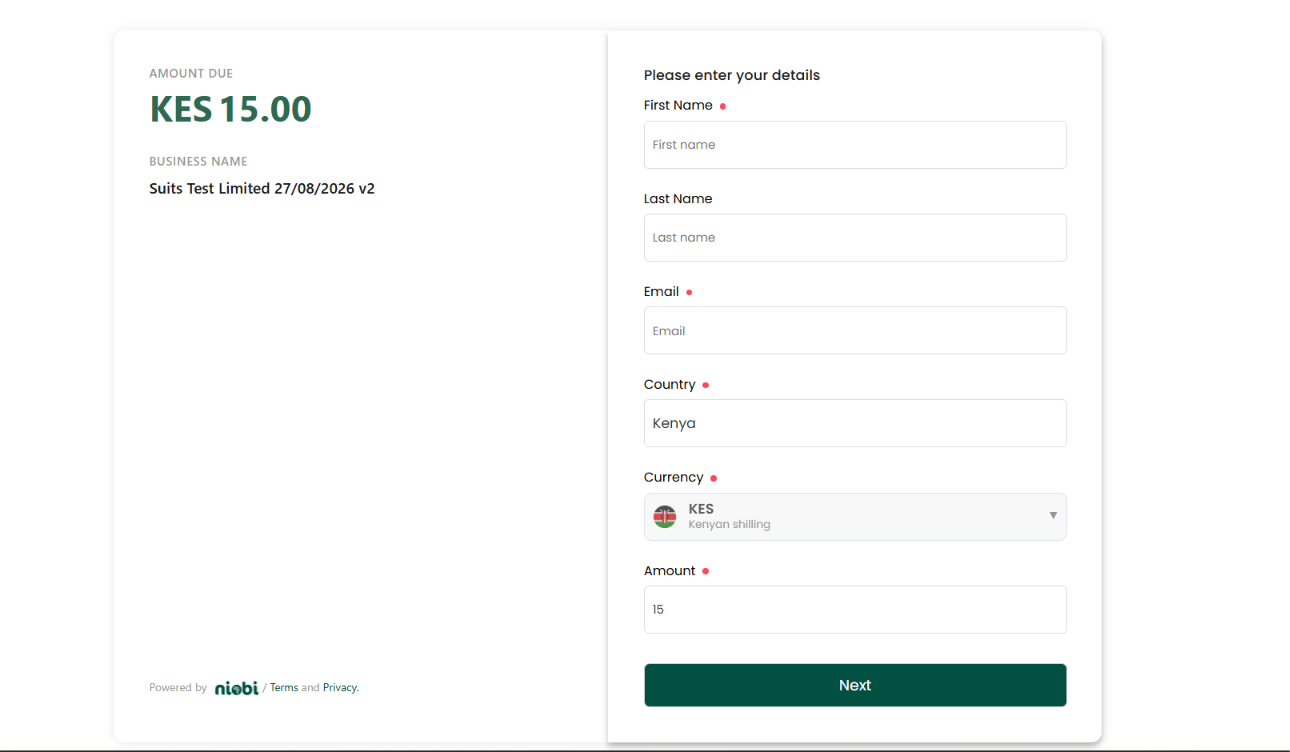
If you want to start accepting payments immediately without building and maintaining custom checkout forms, input validation, or tokenization UI, use **Niobi Hosted Checkout** powered by Payment Links.

<img src="https://mintcdn.com/niobi/bEHho4ScQmdmC_cX/images/niobi-hosted-checkout-page.png?fit=max&auto=format&n=bEHho4ScQmdmC_cX&q=85&s=04781105d848cea0bfae81cceb9c0e92" alt="Niobi Hosted Checkout Interface" width="1290" height="752" data-path="images/niobi-hosted-checkout-page.png" />

#### How It Works:

1. **Create via Dashboard (No-Code) or API:**
   * **Dashboard (No-Code):** Log into your Niobi Dashboard, navigate to **Payments -> Payment Links**, click **Create Payment Link**, configure your business details and amount (fixed or customer-entered), and copy your generated checkout URL immediately.
   * **API (Programmatic):** Call the [Create Payment Link API](/api-reference/payment-links/create) (`POST /api/v3/payment-link-api/create`) to dynamically generate customized payment links on demand from your backend.
2. **Manage & Retrieve:** View, edit, filter, or retrieve active links in the dashboard or via the [Payment Link List API](/api-reference/payment-links/list) (`GET /api/payment-link-api/list`).
3. **Share or Redirect:** Share the link via WhatsApp, SMS, invoices, emails, or redirect customers directly from your web or mobile checkout button.
4. **Automated Settlement & Callback:** The customer completes payment on the secure hosted checkout page. Niobi confirms the transaction, credits your merchant wallet, and dispatches an asynchronous webhook callback (`payment_step: 2`) to your server.

For full implementation details, see [Payment Links Guide](/collecting-payments/payment-links) and [Hosted Checkout & Payment Links](/collecting-payments/methods#hosted-checkout).

***

### Option 2: Direct API Integration (Custom UI / White-Label)

If you require 100% white-labeled control over every UI element and payment form, integrate directly with our collections endpoint:

<Steps>
  <Step title="1. Initiate Collection via API">
    Send a signed `POST` request to `/api/v4/niobi-unified-collections`:

    #### Sample Request

    ```json theme={null}
    {
      "client_id": "YOUR_CLIENT_ID",
      "sender": "YOUR_INTEGRATION_NAME",
      "timestamp": 1724835600,
      "salt": "random_salt_12345",
      "signature": "c6b98e1f5d6a7890bc4e123456789abcdef0123456789abcdef0123456789abc",
      "params": {
        "amount": 10000,
        "currency": "KES",
        "country_id": 1,
        "mobile": "254161166649",
        "payment_method_type": "send money",
        "callback_url": "https://yourdomain.com/niobi/callback",
        "third_party_reference_1": "TX-COLL-1001",
        "third_party_reference_2": "CUST-450"
      }
    }
    ```

    #### Sample Initial API Responses

    <Tabs>
      <Tab title="Initiation Successful (payment_step: 1)">
        ```json theme={null}
        {
          "success": true,
          "message": "We've sent a verification prompt to your phone. Please approve it to complete your payment.",
          "data": {
            "amount": 10000,
            "callback_url": "https://yourdomain.com/niobi/callback",
            "country_id": 1,
            "currency": "KES",
            "mobile": "254161166649",
            "payment_method_type": "send money",
            "third_party_reference_1": "TX-COLL-1001",
            "third_party_reference_2": "CUST-450",
            "status": "success",
            "payment_step": 1,
            "payment_token": null
          },
          "status_code": "000000"
        }
        ```
      </Tab>

      <Tab title="Initiation Failed">
        ```json theme={null}
        {
          "success": false,
          "message": "Payment process initiation failed. Kindly check the details and try again.",
          "status_code": "000005"
        }
        ```

        If an initiation request is rejected outright (e.g. missing fields, invalid phone number, unsupported currency), refer to the [400 Client Errors Guide](/errors/client-errors).
      </Tab>
    </Tabs>

    <Note>
      **Understanding the Two "Success" Indicators:**\
      You will notice two different success indicators in the initial response:

      * **Outer `"success": true` (Root Level):** Indicates the **HTTP API Request Status** ([Request Successfully Initiated](/errors/200-success)). It confirms that your API call was authenticated, structurally valid, and successfully received by Niobi servers.
      * **Inner `"status": "success"` (Inside `data`):** Indicates the **Transaction Initiation State**. Used together with `"status_code": "000000"` and `"payment_step": 1`, it confirms that the upstream provider or telco switch accepted the collection request and triggered the authorization prompt on the payer's device. It signifies successful initiation, not final fund settlement.
    </Note>

    <Tip>
      **The `message` Field:**\
      The `message` string returned in the initial response describes the action the payer must take to complete the transaction. Its wording varies depending on the upstream payment processor or telco switch. Common examples include:

      * `"Verification token was sent to your mobile number. Kindly verify to proceed payment."`
      * `"We've sent a verification prompt to your phone. Please approve it to complete your payment."`

      We recommend displaying this returned message directly in your application UI so payers know to check their device for the authorization prompt.
    </Tip>
  </Step>

  <Step title="2. Customer Authorization">
    Depending on the selected payment method:

    * **Mobile Money (STK Push):** The customer receives an on-screen prompt on their mobile phone and enters their PIN.
    * **OTP Payins (e.g. Ivory Coast Orange):** The customer receives an SMS OTP, which your UI collects and submits to `/api/v4/niobi-unified-process-transaction`.
    * **Virtual Account (e.g. Nigeria):** The initial response returns an `account_number` and `bank_name`. Display these details to the customer to complete a standard bank transfer within 30 minutes.
    * **Browser Redirect (e.g. Wave, South Africa Bank EFT):** The response includes an `authorization_url`. Redirect the customer to open the URL in their browser to complete payment.
  </Step>

  <Step title="3. Handle Final Transaction Outcome">
    When the transaction concludes, Niobi sends an asynchronous callback containing `"payment_step": 2` to the `callback_url` passed under `params.callback_url` in your collection request.

    #### Sample Terminal Callbacks (payment\_step: 2)

    <Tabs>
      <Tab title="Successful Payment (000000)">
        ```json theme={null}
        {
          "client_id": "YOUR_CLIENT_ID",
          "sender": "YOUR_INTEGRATION_NAME",
          "salt": "random_salt_12345",
          "timestamp": 1724835620,
          "signature": "a1b2c3d4e5f60718293a4b5c6d7e8f90123456789abcdef0123456789abcdef0",
          "params": {
            "amount": 10000,
            "depositId": "NIO-D123456789",
            "mobile": "254161166649",
            "name": "Jane Doe",
            "payment_step": 2,
            "reference": "TX-COLL-1001",
            "status": "success",
            "statusCode": "000000",
            "third_party_reference_1": "TX-COLL-1001",
            "third_party_reference_2": "CUST-450"
          }
        }
        ```
      </Tab>

      <Tab title="Failed Payment (000005)">
        ```json theme={null}
        {
          "client_id": "YOUR_CLIENT_ID",
          "sender": "YOUR_INTEGRATION_NAME",
          "salt": "random_salt_12345",
          "timestamp": 1724835625,
          "signature": "e5f6a7b8c90123456789abcdef0123456789abcdef0123456789abcdef012345",
          "params": {
            "amount": 10000,
            "depositId": "NIO-D123456789",
            "mobile": "254161166649",
            "name": "Customer Name",
            "payment_step": 2,
            "reference": "TX-COLL-1001",
            "status": "failed",
            "statusCode": "000005",
            "failureReason": {
              "failureCode": "DS-004",
              "failureMessage": "User cancelled transaction / Request timed out"
            },
            "third_party_reference_1": "TX-COLL-1001",
            "third_party_reference_2": "CUST-450"
          }
        }
        ```
      </Tab>
    </Tabs>

    <Tip>
      **Determine Outcome Using `status` and `statusCode`:**\
      When `"payment_step": 2` arrives, inspect both `params.status` and `params.statusCode` inside the payload:

      * [`status: "success"` with `statusCode: "000000"`](/errors/000000-success): The payment was successfully authorized and credited. Fulfill the order or credit the user account.
      * [`status: "failed"` with `statusCode: "000005"`](/errors/000005-failed): The payment failed or was declined. Inspect `params.failureReason` for specific provider diagnostics.

      `payment_step: 2` always carries one of these two outcomes, there is no separate timeout callback shape. See our [Transaction Status Codes Guide](/errors/transaction-status-codes) for the complete list of system status codes.
    </Tip>

    <Note>
      **Handling Collection Timeouts (`000006`):**\
      `000006` is not a callback outcome, it only appears when you query the [Transaction Status API](/api-reference/get-transaction-status) while a collection is still awaiting customer authorization past the standard 2-minute window. Timeouts can be triggered by several factors:

      * **Customer Inaction:** The payer did not enter their PIN or respond to the prompt before the session expired.
      * **Mobile Operator / SMS Latency:** Delays across the telco network in delivering the STK or USSD push to the user's handset.
      * **Upstream Processor Congestion:** Temporary clearing latency with partner banking switches or mobile money providers.

      If a status query returns `000006`, do not immediately prompt the customer to pay again. Wait 2 to 3 minutes and query again, the transaction will eventually resolve to `success` (`000000`) or `failed` (`000005`), and that final outcome is what arrives in the `payment_step: 2` callback.
    </Note>

    <Note>
      **On-Demand Status Verification:**\
      If you ever need to confirm or query the current status of a collection on demand (for example, if a network disruption delayed your webhook callback), call our [Get Transaction Status API](/api-reference/get-transaction-status) (`POST /api/v3/get-unified-transaction-status`) by passing `"type": "payin"` and your transaction reference in `"id"`.
    </Note>
  </Step>
</Steps>

***

## Next Steps

Follow these guides in order to complete your collection integration:

<div className="next-steps-flow">
  <a href="/collecting-payments/methods" className="next-step-card">
    <div className="next-step-badge">Step 1</div>
    <h3>Collection Methods</h3>
    <p>Choose your payment channels: Mobile Money, Virtual Accounts, Bank EFT, or Redirects.</p>
  </a>

  <div className="next-step-arrow">
    <svg width="24" height="24" viewBox="0 0 24 24" fill="none" xmlns="http://www.w3.org/2000/svg">
      <path d="M5 12h14M12 5l7 7-7 7" stroke="currentColor" strokeWidth="2.5" strokeLinecap="round" strokeLinejoin="round" />
    </svg>
  </div>

  <a href="/collecting-payments/callbacks" className="next-step-card">
    <div className="next-step-badge">Step 2</div>
    <h3>Collection Callbacks</h3>
    <p>Handle terminal payment\_step: 2 callbacks, verify signatures, and reconcile outcomes.</p>
  </a>

  <div className="next-step-arrow">
    <svg width="24" height="24" viewBox="0 0 24 24" fill="none" xmlns="http://www.w3.org/2000/svg">
      <path d="M5 12h14M12 5l7 7-7 7" stroke="currentColor" strokeWidth="2.5" strokeLinecap="round" strokeLinejoin="round" />
    </svg>
  </div>

  <a href="/collecting-payments/best-practices" className="next-step-card">
    <div className="next-step-badge">Step 3</div>
    <h3>Best Practices</h3>
    <p>Implement double-verification reconciliation, status polling limits, and error handling.</p>
  </a>
</div>