
Overview
Sub-Merchant Management allows platforms, marketplaces, aggregators, and payment service providers (PSPs) to onboard and manage distinct merchant entities under a single master Niobi account.Common Use Cases:
- Online Marketplaces: Attribute and settle transactions to specific vendors.
- Payment Facilitators & PSPs: Onboard individual businesses under a single master integration.
- Multi-Brand Enterprises: Segregate reporting, audits, and compliance tracking across regional business units.
Sub-Merchant Onboarding Fields
When onboarding a sub-merchant in the Niobi Dashboard, provide the following information:Compliance Verification:
Please ensure all onboarded sub-merchants align with Niobi’s compliance policies. Once submitted, new sub-merchants enter a compliance review workflow before processing live transactions.
Please ensure all onboarded sub-merchants align with Niobi’s compliance policies. Once submitted, new sub-merchants enter a compliance review workflow before processing live transactions.
Adding a Sub-Merchant via Dashboard
To onboard a new sub-merchant:- Log in to your Niobi Dashboard.
- Navigate to Workspace -> Sub-Merchant.
- Click the Add New Sub-Merchant button.
- Complete the required corporate, licensing, and transaction country details.
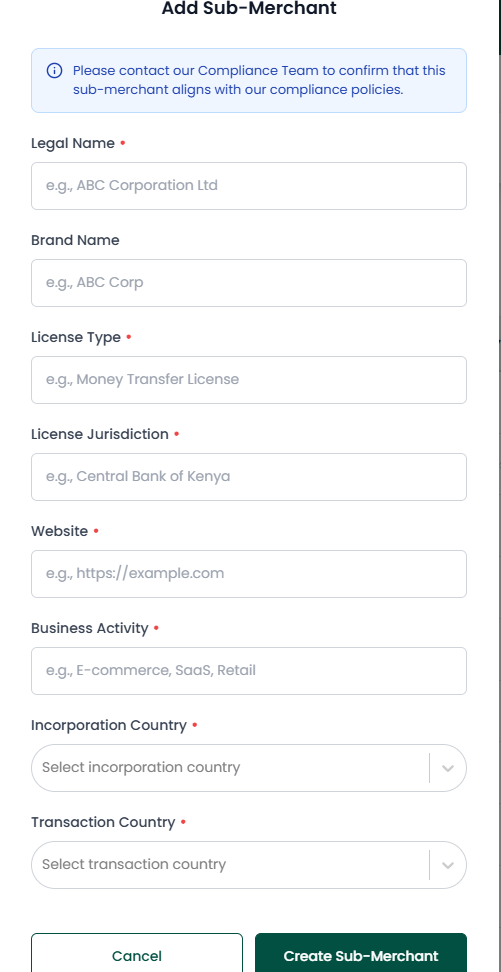
- Click Create Sub-Merchant to submit the entity for compliance review.
- Once created, the sub-merchant will appear in your Sub-Merchant List with its assigned unique UUID (
sub_merchant_id).
Linking Sub-Merchants to Payments & Collections
Once a sub-merchant is created, obtain their uniqueid (UUID format, e.g. 3fa85f64-5717-4562-b3fc-2c963f66afa6) from the dashboard list.
Pass this UUID in the sub_merchant_id field inside params when initiating collections or disbursements:
Sample Collection Request with sub_merchant_id
Sub-Merchant Approval & Lifecycle Statuses
Thestatus field on a sub-merchant record tells you whether it can process live transactions: