

Overview
Because disbursement processing across African mobile money switches and interbank clearing systems is asynchronous, Niobi notifies your server of the final settlement outcome by sending an HTTP POST callback request to theclient_callback_url specified under params.client_callback_url in your disbursement request.
Terminal Callback Guarantee (payment_step: 2)
- The callback is delivered for both successful (
status: "success",statusCode: "000000") and failed (status: "failed",statusCode: "000005") disbursements. - Update your application’s payout records based on both the
statusandstatusCodefields delivered insideparams. See our Transaction Status Codes Reference for details.
Callback Payload Structure
Incoming payout callbacks from Niobi follow the standard signed envelope structure:1. Successful Payout Callback (payment_step: 2)
2. Failed Payout Callback (payment_step: 2)
Callback Payload Parameters (params Object)
Verifying Callback Signatures
Always verify incoming payout callbacks using HMAC SHA-256 before applying ledger balance updates:- Extract Root Fields: Extract
client_id,sender,salt,timestamp, andparamsfrom the callback payload. - Inject Secret Key: Add
"senderKey": "YOUR_SECRET_KEY"into the payload object. - Sort Keys (Recursive K-Sort): Alphabetically sort all keys recursively.
- Flatten & Hash: Convert to key-value query string format concatenated with
&, and hash with SHA-256. - Compare: Compare your computed hash with the
signaturefrom Step 1. If they match, the callback is authentic.
Dual-Layer Confirmation: Querying Payout Status
As an additional layer of confirmation, Niobi encourages querying the transaction status alongside listening for callbacks. Combining the incoming asynchronous callback with an on-demand status query gives your system independent, double-verified confirmation before closing batch payout runs. The full recipe is three steps: rely on the callback as your primary signal, fall back to a status query if it hasn’t arrived, and only close out the payout once that confirmed status is reconciled against your own internal payout records.Endpoint
POST /api/v3/get-unified-transaction-status
Request Parameters (params Object)
Sample Signed Status Query Request
Sample Status Query Response
Reconciling Query Results:
status: "success"(status_code: "000000"): Funds were successfully credited to the recipient. Mark the payout order as completed in your ledger.status: "failed"(status_code: "000005"): The disbursement failed; funds remain in (or have been refunded to) your merchant wallet. Mark the payout as failed.status: "pending"(status_code: "000001"): The transfer is still processing with the destination network switch. Do not take action on this state (do not retry the transfer or adjust recipient balances). Keep the payout in a pending state and await the asynchronous callback (payment_step: 2) or re-query after a brief delay.
Callback Receiver Implementation Guidelines
1. Respond Promptly with HTTP 200
1. Respond Promptly with HTTP 200
Your callback listener should respond with an HTTP
200 OK status as quickly as possible (ideally within 3 to 5 seconds). Perform long-running background tasks (e.g. sending SMS receipts or updating external ERPs) asynchronously in a background job queue after returning 200 OK.2. Implement Idempotent Processing
2. Implement Idempotent Processing
In rare cases of network timeouts between Niobi and your server, callback notifications may be retried. Ensure your callback handler uses
params.reference or params.payment_reference to verify whether a disbursement has already been marked as complete before applying balance adjustments.3. Avoid Aggressive Polling Loops
3. Avoid Aggressive Polling Loops
Rely on the
payment_step: 2 callback as the primary notification mechanism. Do not continuously poll the status API in a tight loop while waiting for a callback; if a callback has not been received after a while, query the Get Transaction Status API (POST /api/v3/get-unified-transaction-status) using spaced intervals.Resending Callbacks via the Payment Portal
You can resend callbacks in case of a delivery failure through the payment portal. To do this, access the specific transaction and click on Resend Callback.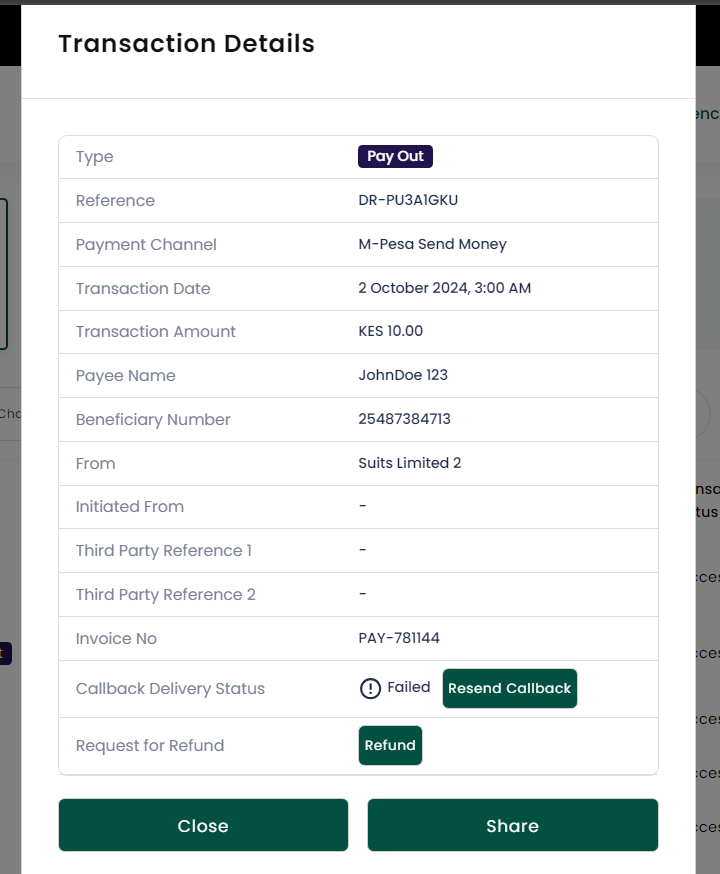
Resending a failed callback delivery directly from the transaction details modal in the payment portal
When can a callback be resent?
The Resend Callback option can only be triggered via the payment portal for a deposit or payout request in cases where the callback was not delivered correctly to your server (for example, if your listener experienced downtime, timed out, or returned an HTTP error). It is not displayed for callbacks that were already acknowledged with HTTP 200.
The Resend Callback option can only be triggered via the payment portal for a deposit or payout request in cases where the callback was not delivered correctly to your server (for example, if your listener experienced downtime, timed out, or returned an HTTP error). It is not displayed for callbacks that were already acknowledged with HTTP 200.